
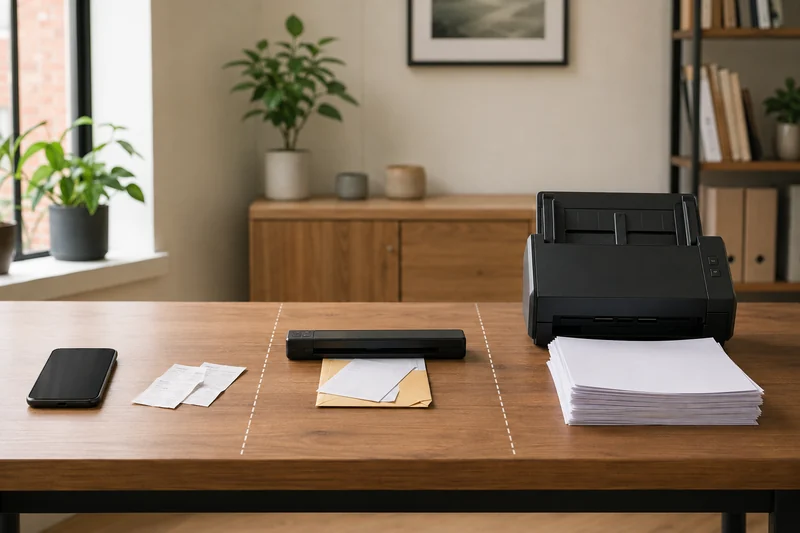
Count the paper before comparing scanners
A scanner can advertise speed, wireless connections, searchable PDFs, and a touchscreen while still being wrong for the job. The useful choice starts with the paper load: pages per session, sides per page, paper sizes, condition, destinations, and how often the routine repeats.
For occasional one- or two-page capture, a phone may be the fastest and least expensive answer. For a weekly stack of double-sided records, manual feeding turns into the cost.
Give the finished scans a backup route
Plan a separate backup destination for the files you intend to keep. The portable SSD versus external HDD comparison helps match frequent file work or scheduled copies to the drive. Open a sample of restored scans before relying on the backup; the first saved copy and an independent backup are different steps.
Run a one-week document audit
Keep the papers you would normally scan in one folder for seven days. Do not collect sensitive information for the audit; count categories and pages only.
| What to record | What it can change |
|---|---|
| Pages per session | Phone, single-sheet scanner, or automatic feeder |
| Single- or double-sided | Need for duplex scanning |
| Receipts, letters, cards, and long pages | Supported sizes and feed path |
| Wrinkles, staples, folds, and mixed stock | Preparation and jam risk |
| Searchable text needed | OCR and software workflow |
| Computer, cloud, email, or shared destination | Connection and profile requirements |
| People using the scanner | Need for simple repeatable controls |
The best device is the smallest workflow that clears this real load without creating more correction and filing work.
Occasional capture: keep the phone for occasional capture
A phone scanning app can crop, straighten, combine, and share a few pages without another appliance. TechGearLab explicitly notes that an app can be the better value for one-and-done or low-volume scanning.
Use this approach when lighting is even, the page lies flat, privacy rules allow the chosen app and storage destination, and OCR accuracy is good enough for the document. A phone becomes awkward when pages repeat, both sides matter, or the filing workflow depends on consistent naming and searchable text.
Light paper loads: portable single-sheet scanning
A slim USB-powered scanner can travel and takes little desk space. It works best when the pile is small and papers can be fed one at a time. The hidden cost is labor: flip every double-sided page, align each sheet, wait, and correct any cropping or rotation.
Do a ten-page rehearsal with scrap paper. If manually feeding and flipping the stack already feels slow, move to an automatic feeder.
Regular batches: routine duplex stacks
A desktop document scanner with an automatic document feeder is built for repeated stacks. Duplex models capture both sides in one pass, and TWAIN support can matter when an existing Windows application expects that standard.
Measure the scanner with its input and output trays open. Check the USB or network route, the computer operating systems, the folder or cloud destination, and the steps needed to create a correctly named searchable PDF. Published pages-per-minute figures are controlled specifications, not a guarantee for mixed, fragile, or heavily corrected documents.
Shared destinations: premium connected workflow
Wi-Fi, a touchscreen, profiles, and direct destinations can reduce repeated setup when several people scan often. Choose those features for a smoother shared workflow, and compare scan quality separately.
Confirm driver requirements before buying. For example, the ScanSnap workflow does not provide a TWAIN driver, which can be decisive for an application that requires one. A touchscreen adds little when one person always scans to the same computer from the same desk.
Test the workflow, not the box
Before the return window closes, scan a safe representative set: a clean letter, a double-sided page, a receipt, a slightly skewed sheet, and a small batch. Do not scan originals that could be damaged until the feed path is understood.
Check:
- missing or duplicated pages;
- front/back order and orientation;
- readable small text and faint print;
- searchable text accuracy;
- filename and destination;
- correction time after the scan;
- cleanup, storage, and restart time.
The real speed is the time from paper pile to correctly filed document.
Add the destination to your paper count
Write the destination application and the required command beside your weekly page count. A scanner that can create a PDF may still be unsuitable when that application requires direct scanner control. Use the software compatibility worksheet to check the driver route or test a harmless imported file before narrowing the hardware shortlist.
Choose the workflow you will repeat
Use a phone for a few occasional pages, a portable single-sheet scanner for light travel or receipt work, a duplex feeder for routine stacks, and a premium connected model only when its profiles and destinations remove repeated steps.
Once the paper load is known, use the scanner specification comparison to check feeder capacity, automatic duplex, connection, power and TWAIN support side by side. A saved-file import and scanning directly inside an application are different workflows; confirm which one your software needs. If a scanner already jams or misses pages, use the feed diagnostic before upgrading.
Separate photos and bound originals before choosing a feeder
A mixed archive can change the buying decision. Set aside bound pages, fragile photographs and other originals that may not belong in a document feed path. The flatbed versus sheet-fed scanner comparison contrasts a removable-lid flatbed with a duplex feeder. Choose for the originals you need to preserve, then size the document feeder for the remaining loose-paper pile. If printing and copying are also part of the project, compare a tank all-in-one with a monochrome laser before buying a second scanner. Print duplex and scan duplex are separate specifications.